Companion
Before you run out
Stock Monitor is a material inventory for the shop floor. It counts your stock against a par level and tells you what to reorder before a job runs dry. It comes with the FlightDeck suite.
Most inventory is a spreadsheet nobody keeps current. Stock Monitor is built for the count walk instead. You set a par for each material once, then update the on-hand count as you go. Anything at or below its par turns magenta, and a banner up top counts how many are low, so the thing that could stop a job is the first thing you see when the app opens.
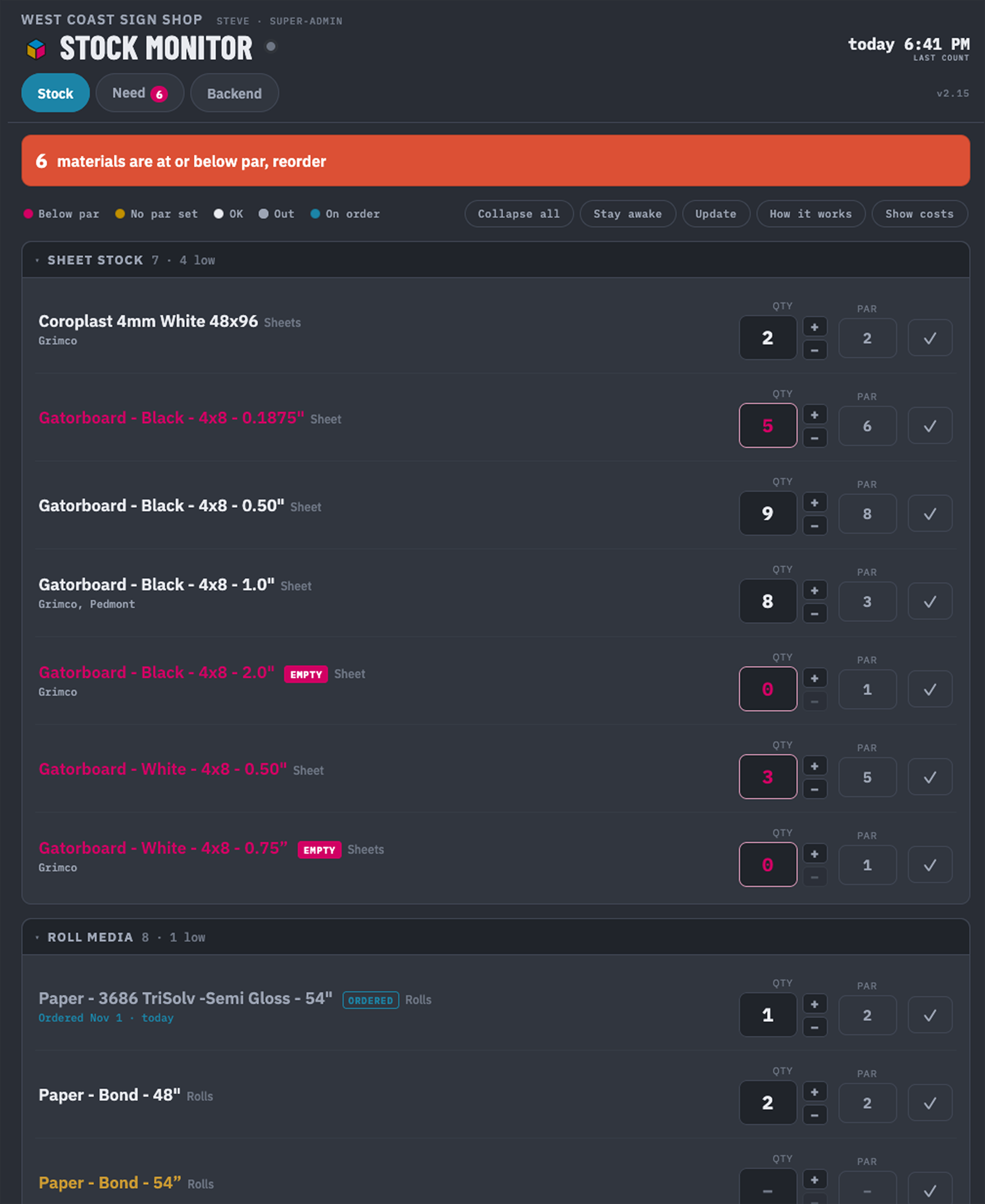
Set a par, see what's low
Give each material a par, the floor you never want to drop below. On-hand at or below it turns the item magenta and adds it to the low count up top. A material counted but with no par yet shows yellow, nudging you to arm it.
A Need tab you can send
Everything below par, grouped by type, showing how much each is short. Copy the list to paste into a supplier email, or print a clean checklist with order and date lines. Mark an item Ordered and it moves to an On order section with the date, then clears itself the moment the count is restocked to par.
A daily email, only when it matters
A once-a-day digest emails the reorder list, but only on a day when something new has dropped below par, so quiet days stay silent. New items are flagged, anything at zero is flagged EMPTY, and ordered or out-of-stock items are left off.
Counts that do not drift
Bump a count with plus and minus on the count walk, or type an exact number. Each item tracks when it was last counted, and anything not checked within your window gets a STALE tag, so a material nobody has verified in months does not quietly rot on the shelf.
Stock value, for your eyes only
Set a cost per unit and flip on Show costs to see a per-item total and a Stock Hold grand total, the dollars sitting in your racks. Costs are admin-only: editors never see the toggle, the figures, or the total, and the server does not send the numbers to them at all.
Yours, offline, on a tablet
Installs as an app and runs offline on a shop tablet, with edits queued until you are back online. Folder logins set three roles, from count-only editors up to a super-admin, and a CSV import bulk-loads your whole catalog at once. No cloud, nothing leaves your shop.
How it fits with FlightDeck
Stock Monitor comes with the FlightDeck suite, alongside Shop Traveler, and the three cover different ground. FlightDeck works at the file level, getting each file clean and onto the RIP. Shop Traveler works at the job level, tracking the jobs those files belong to. Stock Monitor works at the material level, watching the stock those jobs run on. Three companions on the same floor, each useful on its own.
Shop Traveler tracks the jobs; Stock Monitor tracks the materials they run on. Nothing stalls for an empty shelf.